
A customer support knowledge base is a structured, searchable repository of information that support agents and AI systems use to answer customer queries. It contains policy documents, product guides, troubleshooting steps, FAQs, and resolution templates, organized so that both a human agent mid-conversation and an AI copilot can retrieve the right answer in seconds. The quality of a knowledge base is the single biggest factor determining whether an AI copilot suggests accurate replies or generic ones. An AI connected to a complete, well-structured knowledge base achieves 80% to 90% accuracy on common query types. An AI connected to a sparse or outdated one gives answers that damage trust and generate repeat contacts.
This guide covers six things: what a customer support knowledge base is and why it matters more in 2026 than ever before, the structure that makes a knowledge base usable by both agents and AI, the five most common knowledge base mistakes that break AI suggestion accuracy, how to build one from scratch in five steps, what a team without a knowledge base looks like versus one with a well-maintained one, and how to keep it current without it becoming a maintenance burden.
Takeaways
- Self-Service Demand is the New Standard: 92% of customers would use an online knowledge base if one existed, and 98% of customers now rely on FAQ pages or help centers to get answers before contacting support. A well-built customer support knowledge base reduces inbound contact volume before it ever reaches your agents
- AI Accuracy Requires Knowledge Base Grounding: AI suggestion accuracy depends almost entirely on knowledge base quality. As shown in AI customer service benchmark data, modern LLM-based customer support systems achieve 80% to 90% accuracy on common query types when properly grounded. The same AI with no knowledge base or a generic one produces answers that require significant agent editing on every ticket.
- Executive Priorities Have Shifted to Data Quality: According to AI in customer support statistics Knowledge base enhancement is the third-highest AI investment priority for support teams, cited by 29% of C-level customer care executives, trailing only AI-powered bots (44%) and user behavior analysis (42%). Teams that invest in knowledge base quality before deploying AI consistently outperform those that deploy AI first and fix the knowledge base later
- Dramatic Deflection Capabilities: A well-maintained knowledge base reduces contact volume by up to 70%, according to Gartner. Virtual assistants connected to a quality knowledge base deflect routine queries before they reach agents, freeing agent time for complex, high-value interactions that genuinely require human judgment.
- In-Context AI Integration: Omnipulse’s AI copilot for customer support surfaces knowledge base articles inline during live agent conversations. Agents never leave the conversation window to search for a policy or product answer. When the customer support knowledge base is well-structured and current, the copilot suggestion accuracy means agents edit rather than rewrite, cutting handle time per ticket significantly.
Table of Contents
What Is a Customer Support Knowledge Base and Why Does It Matter in 2026?
A customer support knowledge base serves as your company’s single source of truth. Historically, help centers were built purely for external customers to self-serve or for human agents to search manually during customer interactions. In 2026, the nature of customer service has shifted fundamentally.
With 81% of consumers believing AI is essential according to recent AI customer service statistics, knowledge bases are no longer just passive libraries, they are active training materials for your AI copilots, generative models, and automated bots.
When an AI customer service model processes a ticket, it relies on Retrieval-Augmented Generation (RAG) to scan your knowledge base for context. If your knowledge base is well-organized, accurate, and regularly updated, the AI generates hyper-specific, brand-aligned answers. If the knowledge base is chaotic, outdated, or stored in inaccessible formats, the AI will either refuse to answer or output inaccurate responses (“hallucinations”) that irritate customers and burden agents.
An effective customer support knowledge base empowers your operations in three primary ways:
- Deflects repetitive queries via public self-service portals.
- Accelerates human resolution times by surfacing relevant context natively.
- Powers AI automation by supplying accurate, context-rich data to AI engines.
What Structure Makes a Knowledge Base Usable by Agents and AI?
Following best practices in an AI knowledge base guide, your knowledge base needs a clean, highly structured design so human representatives and AI algorithms can instantly parse content.
Atomic Article Design for Your Customer Support Knowledge Base
Keep articles focused on a single topic, resolution path, or question. Instead of creating a massive 3,000-word “Billing Guide,” break it down into atomic units like “How to Change Your Credit Card,” “Understanding Invoice Line Items,” and “How to Request a Refund.” AI vector search retrieves small, specific chunks of text much more effectively than long, multi-topic pages.
Standardized Metadata and Taxonomy
Tag every article with clear categorization (e.g., Category: Billing, Sub-category: Invoicing), explicit user intent keywords, target audience tags (internal vs. external), and lifecycle status. Metadata gives AI algorithms explicit signals regarding when and where an article applies.
Clear Heading Hierarchy
Use predictable semantic HTML headers (##, ###) to create logical separation. Generative AI systems rely on structured formatting to understand parent-child relationships between concepts (e.g., an H3 troubleshooting step beneath an H2 problem description).
Actionable Resolution Templates
For internal knowledge bases, include explicit response templates that an AI copilot can easily pull and customize. Format these with clear placeholders—like [Customer Name] or [Order ID]—so agents or AI models can adapt them cleanly.
What Are the Five Knowledge Base Mistakes That Break AI Accuracy?
Most organizations assume their existing help desk documentation is ready for AI deployment. However, standard human-centric writing frequently causes AI retrieval mechanisms to fail. Avoiding these five critical mistakes in your customer support knowledge base will protect your AI accuracy.
Mistake 1: Writing Articles for Humans Only, Not for AI Retrieval
Human readers automatically fill in context using intuition. For instance, if an article says, “Refer to the table above for regional pricing,” a human can scroll up. An AI vector retrieval system pulls isolated snippets of text; when it grabs a paragraph referencing “the table above,” it loses the essential context.
Solution: Write every article using explicit, self-contained language. Avoid relative pointers like “as mentioned earlier,” “see below,” or ambiguous pronouns like “it” or “they.”
Mistake 2: Storing Knowledge in PDFs or Attached Documents
Many teams upload warranty policies, manuals, or terms of service as attached PDFs or Word documents within a help center page. Most AI copilots cannot efficiently index or parse deep content locked inside attachments.
Solution: Convert all critical policy, product, and troubleshooting content into plain, indexed HTML text directly within your customer support knowledge base. Attachments should only serve as optional supplementary downloads for users.
Mistake 3: Using Internal Jargon That Customers Do Not Use
If a customer submits a ticket asking, “How do I get a human on the phone?”, but your internal customer support knowledge base article is titled “Escalation Protocols for L2 Phone Dispatch” the semantic vector match between the query and the article drops significantly.
Solution: Title and write articles using the natural language, exact phrasing, and common terminology your customers actually use in their support requests.
Mistake 4: Leaving Outdated Articles Live Without a Review Date
An AI copilot ranks content based on semantic relevance, not creation date. If an old 2023 refund policy article matches a query better than a vague 2026 update, the AI will confidently suggest the outdated policy.
Solution: Implement strict expiration metadata, mandatory 90-day review cycles, and immediate archiving protocols for retired products or deprecated processes.
Mistake 5: Building the Knowledge Base After Deploying the AI
Rolling out an AI copilot across your customer support inbox before building a clean, structured knowledge base inevitably results in poor AI suggestions. Agents quickly lose confidence in the AI assistant and turn it off entirely, creating organizational resistance that is difficult to fix later.
Solution: Build a core customer support knowledge base covering your top 20 query types first. Verify content accuracy before turning on AI capabilities for your support team.
How Do You Build a Customer Support Knowledge Base From Scratch?
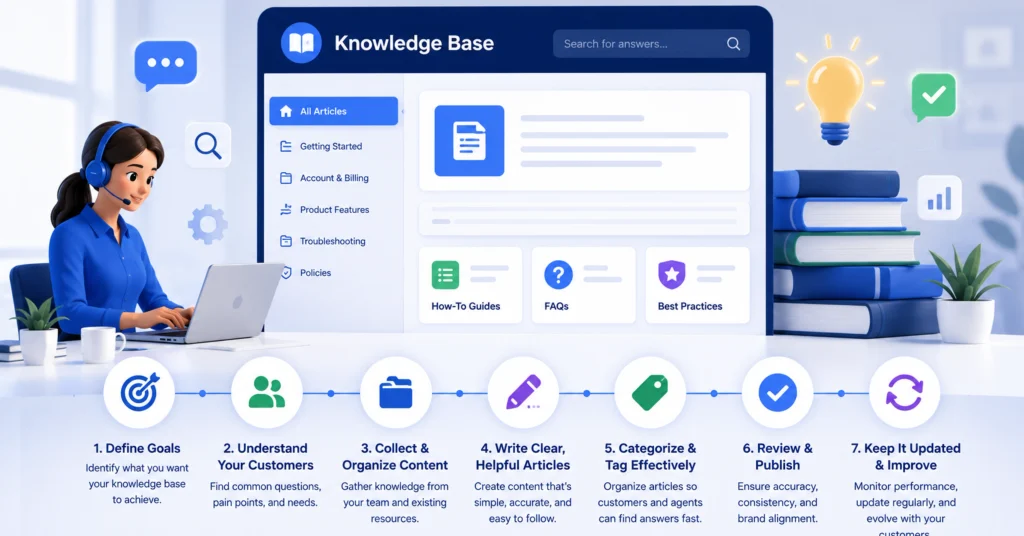
[Step 1: Pull Top 20 Tickets] ➔ [Step 2: Write In Customer Language] ➔ [Step 3: Make Articles <300 Words] ➔ [Step 4: Assign Owners & Dates] ➔ [Step 5: Index & Test with AI]
Step 1: Pull Your Top 20 Ticket Types by Volume
Analyze your support desk reporting over the last 90 days. Group inbound queries into categories and extract the top 20 most frequent issues (e.g., password resets, refund requests, order tracking, subscription updates). These 20 topics account for the vast majority of your overall ticket volume and form your minimum viable knowledge base (MVKB).
Step 2: Write One Article per Ticket Type Using Customer Language
Draft dedicated articles using the exact phrase customers type into search bars or ticket forms as your title. If your users search “How do I cancel my account?”, do not name the article “Account Termination Procedure.” Mirror customer phrasing directly in the title, URL slug, and main heading.
Step 3: Make Every Article Self-Contained in Under 300 Words
Focus each article on answering a single question completely without forcing the reader to click away. Keep explanations clear, direct, and under 300 words. If an issue requires multi-step troubleshooting that exceeds 300 words, split it into modular sub-articles (e.g., “Troubleshooting Connectivity: Step 1” vs. “Advanced Network Settings”).
Step 4: Assign a Review Owner and a 90-Day Review Date
Every article must have a designated human owner (e.g., a tier-2 agent or product specialist) and an explicit review date set for 90 days out. Add a custom field in your CMS for Last Reviewed Date and Content Owner. Set automated calendar notifications to ensure information never becomes stale.
Step 5: Index the Customer Support Knowledge Base in Your Support Inbox Before Enabling AI
Connect your knowledge base directly to your unified inbox for business software. Before launching AI suggestions to your live team, test the engine against 20 historical support tickets. Verify that the AI correctly references your newly indexed articles. Aim for at least 70% accuracy in controlled testing before enabling live agent suggestions.
What Does a Team Without a Knowledge Base Look Like vs. With One?
Below is a comparison of two identical teams—each running 8 support agents handling 400 daily tickets—showing the operational impact of a structured, AI-ready knowledge base:
| Metric | Without Knowledge Base | With Structured Knowledge Base |
| Agent Tab-Switching | 4 to 6 tabs per complex ticket | Zero (articles surface in the inbox sidebar) |
| AI Copilot Accuracy | 30% to 40% usable without editing | 80% to 90% usable without editing |
| Average Handle Time (AHT) | 7 minutes | Under 3 minutes for standard queries |
| New Agent Ramp-Up | 6 to 8 weeks | 2 to 3 weeks with AI surfacing knowledge |
| Self-Service Deflection | Near zero | Up to 40% deflected pre-agent |
| First Contact Resolution | 58% | 76% |
The Real-World Operational Impact
Improving your AI copilot suggestion accuracy from 35% to 85% on 400 daily tickets removes the need for heavy manual rewriting, saving agents roughly 2 minutes per ticket.
$$\text{400 tickets/day} \times \text{2 minutes saved/ticket} = \text{800 agent-minutes saved daily}$$
That equals 13.3 hours of agent labor saved every day—allowing a team of 8 to handle significantly higher ticket volumes without increasing headcount.
How Do You Keep a Knowledge Base Current Without It Becoming a Burden?
Maintaining a customer support knowledge base does not require a large team of dedicated technical writers if you integrate content management into your daily support operations.
- Implement “Knowledge-Centered Service” (KCS): Empower front-line support agents to flag, edit, or create knowledge base articles directly from their inbox interface when they resolve an ungrounded issue.
- Automate Outdated Content Alerts: Set up automated workflows within your customer support knowledge base that notify content owners when an article hits its 90-day review limit or when its customer satisfaction (CSAT) rating drops below a set threshold.
- Monitor AI Search Gaps: Review monthly reports showing queries where your AI copilot searched the customer support knowledge base but found no relevant content. Use these search gaps as a direct prioritized roadmap for your next articles.
- Archive Retired Content Immediately: When a product feature or policy changes, deprecate and archive old articles right away so your vector indexing engine stops serving obsolete information.
Frequently Asked Questions
What is a customer support knowledge base?
A customer support knowledge base is a centralized, digital library containing product documentation, FAQs, policies, and troubleshooting guides used by customers for self-service and support teams for fast issue resolution. When integrated with modern AI engines, it acts as the primary ground-truth dataset that powers automated chat answers and agent copilot suggestions.
How does a customer support knowledge base improve AI copilot accuracy?
An AI copilot relies on Retrieval-Augmented Generation (RAG) to find factual answers to incoming support tickets. When grounded in a clean, comprehensive knowledge base, the AI retrieves verified information directly, boosting its response accuracy to between 80% and 90%. Without a well-structured knowledge base, the AI relies on general training data, leading to vague or inaccurate suggestions.
What should a customer support knowledge base include?
A complete knowledge base should include clear product setup instructions, account management guides, billing and refund policies, step-by-step troubleshooting workflows, canned response templates, and technical specifications. It should also feature internal-only notes, such as escalation rules, that remain hidden from public search engines.
How long does it take to build a customer support knowledge base?
Building a initial minimum viable knowledge base (MVKB) covering your top 20 query types takes about 2 to 3 weeks for a small-to-medium support team. Developing a comprehensive, enterprise-grade help center covering hundreds of edge cases usually takes 2 to 3 months of steady content creation and validation.
What is the difference between an internal and external knowledge base?
An external knowledge base is publicly accessible to customers, allowing them to self-serve answers online without opening a ticket. An internal knowledge base is restricted to company employees, containing confidential operational procedures, escalation paths, internal tooling steps, and agent-only response templates.
How often should a knowledge base be updated?
Knowledge bases should be updated continuously as products change, with formal reviews scheduled every 90 days for every article. Whenever a new feature, bug fix, or policy update launches, updating corresponding knowledge base documentation must be part of the product release checklist.
Can a small support team maintain a knowledge base without a dedicated content person?
Yes, small support teams can maintain a high-quality knowledge base by adopting Knowledge-Centered Service (KCS) principles. By encouraging support agents to update articles as part of their regular ticket resolution workflow, content updates are handled organically without needing a dedicated writer.
Why does my AI give wrong answers even though I have a knowledge base?
AI models usually give incorrect answers because your articles contain contradictory information, rely on PDF attachments the AI cannot index, use internal jargon that misses customer intent, or lack clear formatting. Cleaning up outdated articles, using direct customer language, and standardizing formatting usually fixes AI accuracy issues quickly.