When businesses modernize how they talk to customers, they meet a maze of overlapping terms: CPaaS, CCaaS, omnichannel software, messaging APIs and engagement suites. Two of the most common options on the shortlist are CPaaS and a customer communication platform.
This customer communication platform vs CPaaS guide explains the difference. Both handle customer communication, but treating them as interchangeable leads to mismatched budgets, delayed rollouts and frustrated teams. The core difference is where the software sits in your stack. CPaaS provides communication infrastructure and APIs for developers. A customer communication platform provides a complete working environment for customer-facing teams, with shared inboxes, routing, customer timelines, automation and analytics ready to use.
Table of Contents
What Is CPaaS?
If you are asking what is CPaaS, the short answer is that it is a cloud delivery model. CPaaS, or Communications Platform as a Service, provides communication capabilities through APIs. Instead of building telecom infrastructure or managing carrier connections, developers embed communication features directly into their own applications.
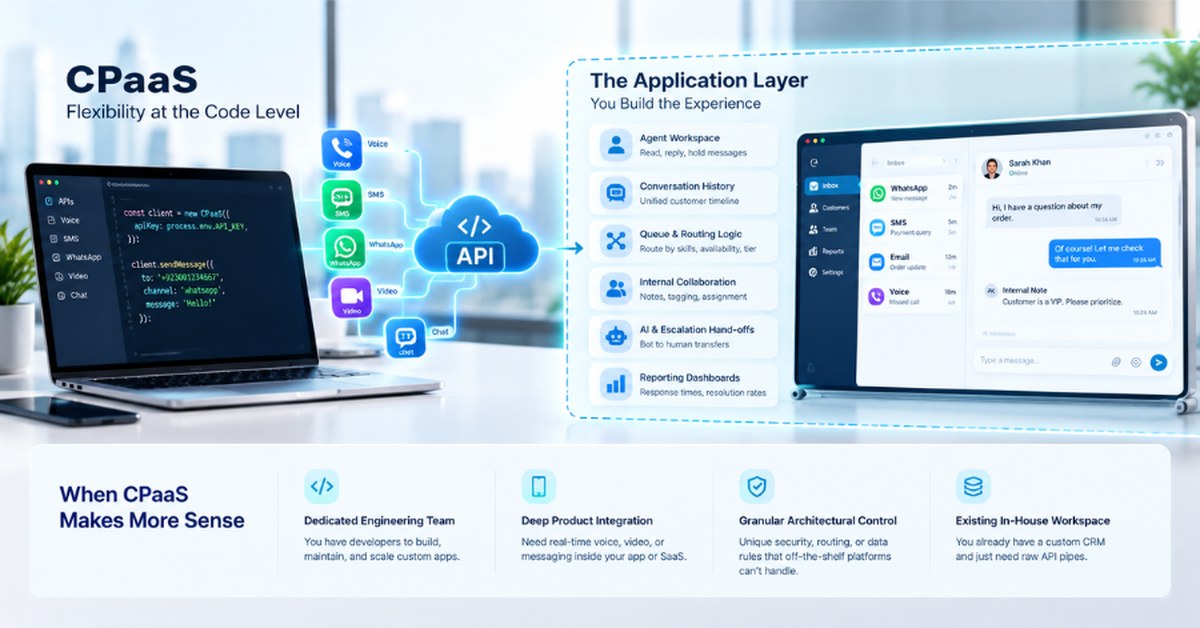
Typical CPaaS building blocks include:
- Programmable SMS and MMS
- Voice calling and interactive voice response building blocks
- Messaging APIs, such as WhatsApp Business API endpoints
- Video calling
- Number masking and two-factor authentication
Key idea: CPaaS gives developers the raw building blocks of digital communication. It does not normally include a ready-to-use screen for support agents or sales representatives.
What Is a Customer Communication Platform?
A customer communication platform is software built around the day-to-day management of customer conversations. Rather than only supplying APIs, it gives teams an end-to-end environment. Depending on the product, that usually includes:
- Omnichannel messaging across WhatsApp, SMS, email, voice and web chat
- A unified shared inbox for support and sales teams
- Customer timelines with full conversation history
- Automated routing and agent assignment
- AI agents and workflows with context-aware human escalation
- Built-in CRM, lead management and ticketing
- Operational and commercial analytics
In short, it gives business teams a complete place to manage conversations without custom application development. For a deeper look at features, read our guide to customer communication software.
Customer Communication Platform vs CPaaS at a Glance
| Dimension | CPaaS | Customer Communication Platform |
|---|---|---|
| Primary purpose | Communication infrastructure and developer APIs | Operational management of customer interactions |
| Main user | Developers, engineering teams, product managers | Support agents, sales reps, operations, CX leaders |
| Channel connectivity | Separate API endpoint per channel | Many channels unified in one interface |
| Agent workspace | Must be built or integrated separately | Included out of the box |
| Shared inbox | Requires custom development | Core feature |
| Customer timeline | Needs a custom database and application layer | Native unified history |
| Automation and AI | Programmed by developers | Pre-configured workflows and AI escalation |
| CRM and leads | Integrated through external API logic | Often built in |
| Analytics | API usage, latency and carrier-level metrics | Team productivity, resolution times, conversion |
| Implementation | High technical effort and long build cycles | Fast deployment with low-code setup |
Customer Communication Platform vs CPaaS: Infrastructure vs Operations
The CPaaS mindset says, “Give us the communication pipelines so our engineers can write software around them.” The platform mindset says, “Give our support, sales and operations teams the workspace they need to manage conversations today.”
CPaaS supplies the plumbing. A customer communication platform supplies the room, the fixtures and the controls. Both are valid, but they solve different layers of the problem.
CPaaS Gives You Flexibility, But Who Builds the Experience?
The main advantage of CPaaS for developers is complete architectural control. Engineers can craft tailored flows, embed real-time communication in a proprietary mobile app or design custom call logic.
The catch is the application layer. With a pure CPaaS approach, your team must design, code, host and maintain everything around the API:
- The agent workspace: an interface where agents read, reply to and hold messages across channels.
- Conversation history: a database that merges multi-channel history into one customer timeline.
- Queue and routing logic: code that routes conversations by skill, availability or customer tier.
- Internal collaboration tools: notes, tags and assignment controls for complex cases.
- AI and escalation handoffs: state management that moves a conversation cleanly between bots and people.
- Reporting dashboards: views for response times, resolution rates and volumes.
Without dedicated engineering capacity, this ballooning scope leads to long timelines and heavy maintenance.
When CPaaS Makes More Sense
CPaaS for developers is the right choice when technical flexibility at the code level is the priority. It fits when your business:
- Has a dedicated engineering team able to build, maintain and scale custom software.
- Needs deep product integration, such as in-app calling for a ride-hailing service or chat inside a telemedicine app.
- Demands granular control because security, routing or data-handling rules are too unusual for off-the-shelf tools.
- Already has an in-house workspace, such as a custom CRM or contact center, and only needs API pipes.
When a Customer Communication Platform Makes More Sense
A platform is the better fit when the goal is to let teams talk to customers without writing software. It fits when your business:
- Needs an agent workspace now, with a unified inbox for support and sales.
- Wants multi-channel consolidation across WhatsApp, SMS, email, voice and social messaging.
- Needs unified customer context so agents see earlier touchpoints in one place.
- Wants built-in automation and AI to handle routine questions and pass complex cases to staff.
- Needs routing, ticketing and CRM features without custom code.
- Values deployment speed. Omnipulse customers see an average setup time of about five days, compared with the months a custom build can take.
CPaaS Total Cost of Ownership: What the Price Really Includes
Many buyers compare only line items, such as a per-message API rate against a platform subscription. That ignores CPaaS total cost of ownership, which usually covers more than usage fees:
- Direct usage costs: per-segment SMS, per-minute voice or per-conversation messaging fees.
- Initial development: engineering time or consultants to build the workspace, routing engine and analytics.
- Infrastructure and hosting: databases, servers and message queues.
- Ongoing maintenance: bug fixes, API version updates and new feature requests.
On the buy side of build vs buy communication software, a platform usually brings predictable subscription or seat pricing, pass-through channel costs, onboarding and standard connectors. Compare the full cost of reaching the outcome you want, including developer time, not just the cost of a message.
Build vs Buy: The Real Decision
Underneath the feature list is a build vs buy communication software decision. Ask what your main goal is: embedding communication into a custom app, or empowering business teams to handle conversations.
The Build Model (CPaaS)
- Communication is a core differentiator of your own software product.
- You have strong engineering resources for long-term maintenance.
- Full control over application code is mandatory.
The Buy Model (Customer Communication Platform)
- Speed to value and operational efficiency are the priority.
- Non-technical teams need intuitive tools today.
- You want to avoid maintaining custom chat and messaging software.
The Hybrid Model
Many enterprises use both, and CPaaS for developers often sits behind a platform that teams use daily. A business might use CPaaS APIs for transactional alerts inside its mobile app while running a customer communication platform for support and sales teams.
Customer Communication Platform vs CPaaS for Buying Committees
| Role | Core priority | Usually prefers |
|---|---|---|
| Engineering lead | Flexibility and code maintainability | CPaaS |
| IT director or CIO | Security, scalability and rollout risk | Platform or hybrid |
| Customer support director | Resolution speed, unified inbox, routing | Platform |
| Sales and operations manager | Lead response time and CRM integration | Platform |
| CX director | Context retention and CSAT | Platform |
| Product manager | Native experience inside the app | CPaaS |
| Executive leadership | Time to value and total cost | Platform |
8 Capabilities to Check in a Customer Communication Platform
If a platform fits your goals, make sure it includes these core capabilities:
- Omnichannel architecture: WhatsApp, SMS, email, social and voice in one pipeline.
- Unified agent workspace: a shared queue and WhatsApp shared inbox for collaboration.
- Customer interaction timeline: history across every channel.
- Intelligent routing: assignment by skill, department or customer status.
- AI with contextual escalation: automation for routine questions and smooth handoff to people.
- CRM and lead management: lead qualification and status tracking in the workflow.
- Ticketing and service management: structured requests, statuses and SLAs.
- Analytics: visibility into response metrics, agent performance and conversion.
Customer Communication Platform vs CPaaS: A Practical Decision Framework
Settle the customer communication platform vs CPaaS question by asking these questions with your engineering, IT and customer teams:
- Do we need raw API endpoints, or a working daily interface for our teams?
- Who will build, host and maintain the application layer and agent tools?
- Do agents need a shared inbox to collaborate across channels?
- Is communication part of our product, or part of how we serve customers?
- How quickly must this be live?
- What is the true cost of build-and-maintain versus subscription?
| If your primary need is… | Choose |
|---|---|
| Embedding custom communication features in your own mobile app | CPaaS |
| One place for support to handle WhatsApp, email and voice | Customer communication platform |
| You already have an agent desktop and only need API pipes | CPaaS |
| Automating routine queries with AI and routing complex cases fast | Customer communication platform |
| Deploying a customer workspace in days, not months | Customer communication platform |
How Omnipulse Fits the Platform Model
Omnipulse is a customer communication platform for teams that want results without assembling fragmented APIs. It provides an integrated workspace for managing customer interactions:
- Unified workspace and inbox: WhatsApp, SMS, email and voice in one place.
- Customer timelines: every touchpoint in a visible interaction history.
- AI agents and escalation: routine questions automated, edge cases handed to people with context.
- Intelligent routing and ticketing: conversations directed by rules, skills or lead parameters.
- Voice: IVR software for businesses alongside digital channels.
- CRM and lead management: leads captured, qualified and routed.
- Analytics: dashboards for response times, resolution and conversion.
If you also need API access, Omnipulse offers APIs and webhooks for custom integrations, so a hybrid approach stays possible.
Customer Communication Platform vs CPaaS: Which Should You Choose?
- Choose CPaaS when your goal is developer control or embedding communication in a proprietary product.
- Choose a customer communication platform when your goal is equipping support, sales and operations with a complete workspace.
- Choose both when you need API integrations for product features and an operational platform for customer-facing teams.
In the customer communication platform vs CPaaS debate, the right question is not “Which technology is better?” It is “Which layer of the problem are we solving: the backend infrastructure or the operational workspace?”
Frequently Asked Questions
What is CPaaS?
CPaaS (Communications Platform as a Service) is a cloud framework that gives developers APIs and tools to embed communication features such as SMS, voice and messaging into business software.
What is a customer communication platform?
A customer communication platform is ready-to-use software for teams to manage customer interactions across channels, typically with shared inboxes, routing, customer history, automation, CRM tools and analytics.
What is the difference between CPaaS and a customer communication platform?
CPaaS provides infrastructure and APIs for developers to build on, while a customer communication platform provides an operational workspace business teams can use immediately.
Is CPaaS the same as an omnichannel platform?
No. CPaaS offers individual channel APIs that developers assemble into an application, while an omnichannel platform gives you a pre-built environment where channels work together.
When should a business choose CPaaS?
Choose CPaaS when you have dedicated developers, need communication embedded in a custom application or require deep control over code logic.
When should a business choose a customer communication platform?
Choose a platform when you need a ready workspace quickly, want agents to manage multi-channel conversations and need built-in automation and routing.
Is CPaaS cheaper than a customer communication platform?
Not necessarily. Per-message API rates can look low, but total cost of ownership includes developer time, hosting, maintenance and feature updates.
Does CPaaS require developers?
Yes. Using CPaaS requires developers to build, integrate and maintain the application code around the APIs.
Can a business use CPaaS and a customer communication platform together?
Yes. Many organizations use CPaaS APIs for custom features in their own products and a platform for frontline support and sales conversations.
How does Omnipulse compare with a CPaaS approach?
Omnipulse is a complete customer communication platform with shared inboxes, timelines, AI agents, routing, CRM tools and analytics, so you do not need to build agent software on top of raw APIs.
Ready to see the platform approach in action? Book an Omnipulse demo and we will walk you through the workspace, channels and automation your team can use in days.