Every online retailer knows the frustration. A shopper lands on your site, browses the catalog, builds a cart and leaves before paying. Most teams treat that as a lost transaction and chase it with a generic email.
A better view is that an abandoned cart is a high-intent signal from an engaged customer. Strong abandoned cart recovery moves past one-way reminders and combines SMS, WhatsApp and email with real customer context, automated workflows and easy access to a human when the shopper needs one.
Table of Contents
What Is Abandoned Cart Recovery?
Abandoned cart recovery is the process of re-engaging customers who add products to an online cart but leave before completing the purchase. Email is still the usual starting point, but a modern approach uses every channel the customer already reads:
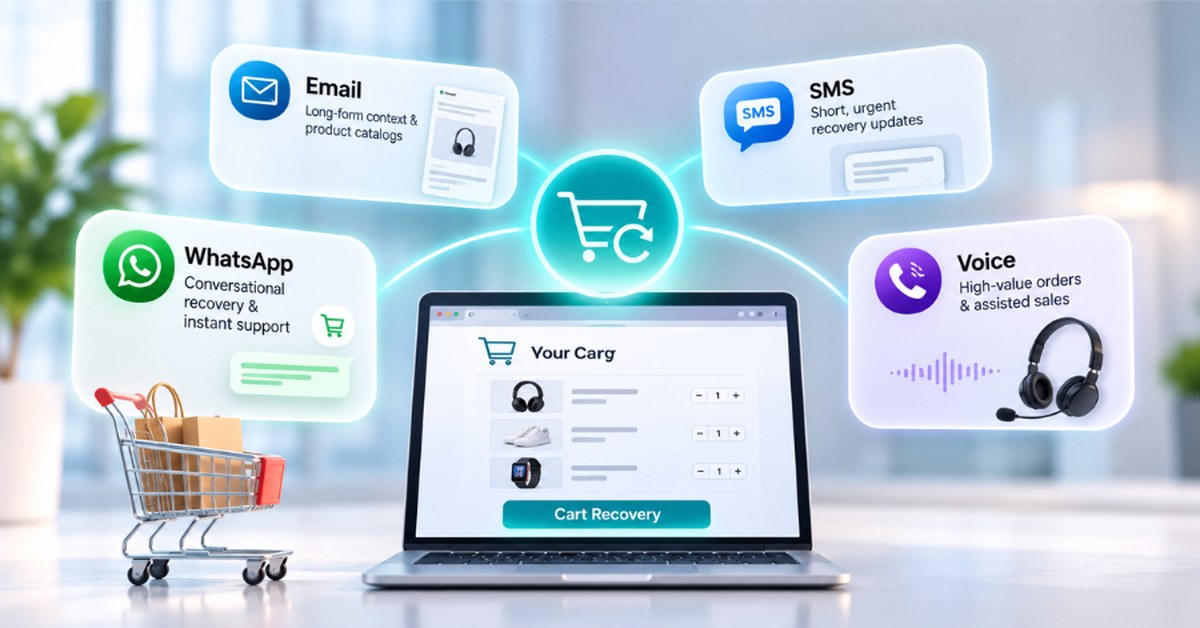
- Email: detailed product information and broader marketing content.
- SMS: short, time-sensitive reminders that land on the lock screen.
- WhatsApp: interactive two-way conversations with rich media and live support.
- Personalized offers: incentives based on cart value and customer history.
- Customer service follow-up: human help for shoppers who hit friction at checkout.
It helps to know the scale of the problem. The Baymard Institute puts the average documented cart abandonment rate at roughly 70 percent, based on dozens of studies. That is a lot of buying intent to leave on the table.
7 Cart Abandonment Reasons and How to Fix Each One
To recover a cart you need to know why the shopper walked away. A blanket discount does not answer every kind of hesitation. The Baymard research ranks extra costs such as shipping, tax and fees as the top cause, ahead of slow delivery, a forced account and a long checkout. Match your message to the cause:
- Unexpected costs: shipping, taxes or fees appear late. Show total cost early, and use abandoned cart messages that explain delivery options clearly.
- Comparison shopping: the buyer is checking competitors. Send a reminder that highlights what makes your product different.
- Purchase hesitation: doubts about size, specifications or fit. Offer a quick answer on WhatsApp instead of a discount.
- Payment friction: failed payments or rigid forms. Send a simple link back to the saved cart with an alternative payment option.
- Distraction: a real-world interruption mid-checkout. A gentle SMS reminder is usually enough.
- Delivery uncertainty: vague shipping timelines. Confirm delivery dates in the message itself.
- Lack of confidence: worries about returns, quality or security. Lead with your return policy and trust signals.
Tailoring outreach to these cart abandonment reasons produces better results than a generic “You left something behind” nudge.
Why a Multi-Channel Recovery Strategy Works Better
Email remains a cornerstone of ecommerce marketing, but inbox saturation means it should not be your only recovery channel. When the platform detects an abandoned cart, it can choose the channel that fits the moment:
- Email: best for non-urgent, media-rich follow-ups that explain product specs or return policies.
- SMS: ideal for concise, time-sensitive reminders such as a low-stock warning.
- WhatsApp: excellent for two-way engagement, so shoppers can reply with questions about shipping, sizing or payment.
The goal is not to replace one channel with another. It is to reach the shopper at the right time, in the right format, based on preference, cart value and urgency.
SMS vs WhatsApp vs Email for Cart Recovery
| Channel | Best For | Core Strength | Key Advantage |
|---|---|---|---|
| Long-form context and product catalogs | Flexible visual layout | Low cost and room for detail | |
| SMS | Short, urgent updates | High immediate visibility | Lands in the native mobile inbox |
| Conversational recovery and instant support | Two-way interaction and rich media | Real-time Q&A and escalation to an agent | |
| Voice | High-value orders and assisted sales | Personal human connection | Resolves complex, high-friction questions |
Choose SMS cart recovery for speed, email for detail and WhatsApp when the shopper is likely to have a question. You can explore each channel on the Omnipulse SMS marketing platform, email automation platform and WhatsApp Business API platform pages.
The First Abandoned Cart Message
Your first message sets the tone for the whole journey. It should do four things:
- Remind the shopper without sounding pushy.
- Name the product they selected.
- Give a direct, friction-free link back to the cart.
- Offer help if something went wrong.
For example: “Hi Alex, still thinking it over? Your items are saved in your cart. Complete your order whenever you are ready, and let us know if you have any questions.”
Avoid leading with a discount. Automatic price cuts lower your margin and train shoppers to abandon carts on purpose to wait for a deal.
Personalization Beyond the Customer’s Name
Inserting a first-name tag into a template is not real personalization. Contextual personalization uses the selected product, past purchases and browsing history, loyalty status, open support tickets and regional shipping preferences to make each message relevant.
- Weak: “Hi Sarah, you left something in your cart!”
- Contextual: “Hi Sarah, we noticed you were looking at the Trailhead Hiking Boots in size 8. Have a question about fit or delivery? Reply here and our team can help.”
With browsing history, earlier support conversations and product details in the message, the nudge reads like a helpful check-in rather than a cold sales push.
Using WhatsApp for Abandoned Cart Recovery
A WhatsApp abandoned cart message turns a reminder into a conversation. Connected to your commerce stack, WhatsApp Business bridges marketing automation and live support. The main capabilities are:
- Product visuals: include clear images or short video demos in the chat.
- Conversational engagement: let shoppers ask “What is your return policy?” or “Do you have this in blue?” and get an instant answer.
- Human escalation: route the chat to a support representative when the buyer needs personal help.
Only message customers who have opted in to WhatsApp updates, and keep the content relevant to the cart they actually built. Our guide to a WhatsApp shared inbox shows how teams manage these replies together.
Do Not Treat Every Abandoned Cart the Same
A blanket strategy treats a small accessory like a high-ticket order. Segment carts so your team spends effort where it matters:
- High-value carts: route to real-time chat agents or a priority queue.
- First-time shoppers: lead with trust signals such as guarantees, easy returns and reviews.
- Returning customers: keep messages short, with a quick checkout link.
- Shoppers with open questions: answer the question first, before any automated reminder.
- Serial abandoners: send helpful content instead of repeated discounts that erode margin.
When to Send Abandoned Cart Messages
Rather than sending one arbitrary notification, build a journey around customer intent. A common cadence looks like this:
- Stage 1, friendly reminder (30 to 120 minutes after abandonment): re-engage shoppers who were simply distracted.
- Stage 2, help and information (12 to 24 hours): share sizing guides, shipping details or FAQs to resolve lingering doubts.
- Stage 3, targeted incentive (24 to 48 hours): offer free shipping or a time-limited incentive only if it makes commercial sense for that cart segment.
- Stage 4, human handoff (when the shopper replies): pass the conversation to an agent to answer questions and close the sale.
Treat these timings as a starting point and test them against your own customers and products.
Connect Cart Data With Customer Conversation History
Cart data should not live in a vacuum. When systems are disconnected, agents ask repetitive questions and sales slow down. Linking your storefront to a central customer communication software solution gives the team full context:
- Cart event triggered: the storefront flags the abandoned cart and its items.
- Context matched: the system connects the cart to past orders, messages and preferences.
- Automated outreach: a tailored message goes out by SMS or WhatsApp.
- Interactive response: the customer replies with a question about delivery.
- Shared timeline: agents see the cart contents and conversation history side by side and can answer straight away.
What Happens When the Customer Replies?
The moment a shopper responds, marketing automation turns into customer support. Imagine this exchange:
- Automated WhatsApp: “Hi Jordan, still interested in the leather weekend bag in your cart?”
- Customer reply: “Yes, but I need it by Friday for a trip. Will standard shipping make it in time?”
If your recovery software cannot process replies, that sale is lost. With a unified platform the reply goes straight to an AI assistant or live agent who can confirm delivery dates, upgrade shipping and help finish the order.
Using Customer History to Improve Recovery
Every touchpoint informs the next recovery attempt. A central interaction timeline helps your team spot what drives decisions over time:
- Previous orders: recognize VIP shoppers and adjust your tone.
- Past support tickets: skip promotional nudges for a customer who is dealing with a recent return or issue.
- Channel preferences: reach out on the channel the customer engages with most.
How to Measure Abandoned Cart Recovery
Track a small set of metrics to see the real financial impact of the program:
- Recovery rate: the percentage of abandoned carts that turn into completed orders.
- Recovered revenue: the currency value generated directly by recovery workflows.
- Channel engagement: open, click and reply rates across SMS, WhatsApp and email.
- Assisted conversion rate: the share of recovered sales that involved a conversation with an agent or AI assistant.
- Opt-out rate: unsubscribes show whether your cadence is helpful or disruptive.
For related support metrics, see our guides to customer support KPIs and the response time SLA by channel.
7 Common Abandoned Cart Recovery Mistakes
- Relying only on email: you miss shoppers who live in messaging apps.
- Discounting every cart: it erodes margin and trains buyers to wait.
- One-size-fits-all messaging: it ignores cart value, product type and buyer history.
- Ignoring customer replies: answers never reach an active support queue.
- Siloing marketing and support: recovery becomes advertising instead of customer care.
- Over-messaging: too many follow-ups drive customers to opt out.
- Tracking clicks instead of revenue: open rates do not equal completed sales.
How Omnipulse Supports Multi-Channel Cart Recovery
Omnipulse is the communication layer that sits on top of your ecommerce platform. While your storefront tracks carts and inventory, Omnipulse turns those events into two-way customer conversations.
- Unified workspace: manage WhatsApp, SMS, web chat and email in one team inbox.
- AI and automated routing: let AI agents handle routine questions, with instant escalation to live team members.
- Integrated history: unified customer timelines link cart contents with earlier chats.
- Streamlined setup: the average setup time is about five days, with flexible workflows that fit your existing stack.
Learn how channels work together in our omnichannel customer communication guide.
Example Omnipulse Cart Recovery Workflow
- Cart abandoned: the customer leaves checkout with items in the cart.
- Event triggered: your store sends the event data to Omnipulse.
- Context identified: Omnipulse pulls shopper history and channel preferences.
- Smart outreach: a personalized WhatsApp or SMS message is sent.
- Customer engagement: the shopper replies with a product question.
- AI or human handoff: AI answers quick questions or routes to a support agent.
- Purchase completed: the customer gets an answer and finishes checkout.
- Performance analytics: the system tracks recovery metrics and revenue generated.
Frequently Asked Questions
What is abandoned cart recovery?
Abandoned cart recovery is the strategy of re-engaging online shoppers who added products to their cart but left without completing the purchase.
Why do customers abandon online shopping carts?
Common reasons include unexpected shipping costs, checkout friction, hesitation about product details, delivery uncertainty or simple distraction.
How can retailers recover abandoned carts?
Retailers can combine automated reminders, personalized multi-channel messaging across SMS, WhatsApp and email, and real-time customer support.
Is SMS effective for abandoned cart recovery?
Yes. SMS is visible right away, which makes it a good fit for brief, time-sensitive reminders.
Can WhatsApp be used for abandoned cart recovery?
Yes. WhatsApp lets retailers send media-rich updates and answer shopper questions in a two-way conversation, as long as the customer has opted in.
When should an abandoned cart message be sent?
A common cadence starts with a friendly reminder within 30 to 120 minutes, adds helpful product information at 12 to 24 hours and offers an optional incentive at 24 to 48 hours.
Should retailers offer discounts to recover abandoned carts?
Not automatically. Leading with helpful service or answering questions often recovers sales without cutting into margin.
How can personalization improve cart recovery?
Contextual personalization uses cart items, past purchases and support history so follow-ups feel relevant instead of generic.
What happens when a customer replies to an automated cart-recovery message?
With a unified communication platform the reply goes to an AI assistant or human agent who can answer questions and help complete the sale.
How can Omnipulse help with abandoned cart recovery?
Omnipulse connects store data with channels such as WhatsApp and SMS and combines automation with human support to turn abandoned carts into completed orders.
Turn abandoned carts into customer conversations. Connect your storefront events with personalized messaging across the channels your customers use every day, then request an Omnipulse demo.